Desktop Audio Player Java
A desktop audio player built with Java Swing and the Java Sound API that supports playback of WAV, AIFF, and AU audio files while exploring thread-safe UI updates, native audio resource management, and Java Platform Module System (JPMS) architecture.
Screenshots
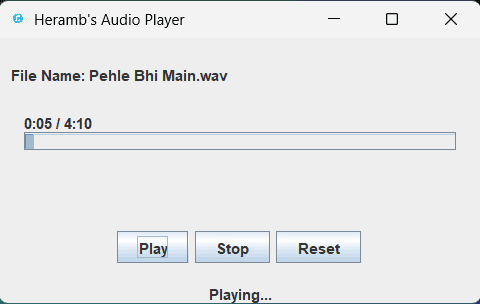
Key Metrics
WAV · AIFF
Desktop GUI Application
Zero External Dependencies
JPMS
100ms
Java Sound API
Overview
Desktop Audio Player Java is a desktop media player designed to explore Java's native audio ecosystem, Swing event-driven programming, and desktop application architecture. The application supports loading and playing PCM audio files while maintaining EDT-safe UI updates and proper audio resource lifecycle management. :contentReference[oaicite:1]{index=1}
Problem
Most introductory Java GUI projects focus on basic interface creation without addressing real-world concerns such as thread safety, media playback, resource management, and platform module architecture. Building an audio player provides an opportunity to understand these concepts in depth.
Solution
Developed a desktop audio player using only Java's built-in libraries, combining Swing-based UI components, Java Sound API playback, JPMS module declarations, progress tracking, and native resource cleanup while following Swing's Event Dispatch Thread model.
Architecture
Single-process desktop application built around a Swing JFrame interface and Java Sound API playback engine. Audio files are loaded through JFileChooser, played using Clip-based audio playback, and monitored through EDT-safe javax.swing.Timer callbacks that update playback position and progress indicators. The application is packaged using the Java Platform Module System with explicit java.desktop dependencies. :contentReference[oaicite:2]{index=2}
Challenges
- Understanding Swing Event Dispatch Thread (EDT) rules.
- Implementing thread-safe UI updates.
- Evaluating Clip versus SourceDataLine tradeoffs.
- Managing native audio resources and file handles.
- Configuring JPMS module dependencies.
- Designing playback progress synchronization.
- Handling media lifecycle events within Swing.
Lessons Learned
- Swing concurrency and EDT architecture.
- Native resource management versus garbage collection.
- Java Sound API internals.
- Media playback lifecycle management.
- JPMS module system concepts.
- Desktop application architecture patterns.
- Polling versus event-driven update strategies.
- Tradeoffs between different audio playback APIs.
Future Improvements
- MVC architecture refactor.
- SwingWorker-based background loading.
- try-with-resources for AudioInputStream.
- File extension filtering.
- Playback completion detection via LineListener.
- Gradle build system migration.
- JUnit 5 test coverage.
- MP3 and FLAC support.
- Volume controls.
- Playlist management.
- JavaFX migration exploration.